 Back to Blog
 MCP is the Key for Agents
The key to opening the door to your product and content inventory for agents is MCP! This is how Roland Eisenbrand (OMR) derived it in his keynote at OMR.

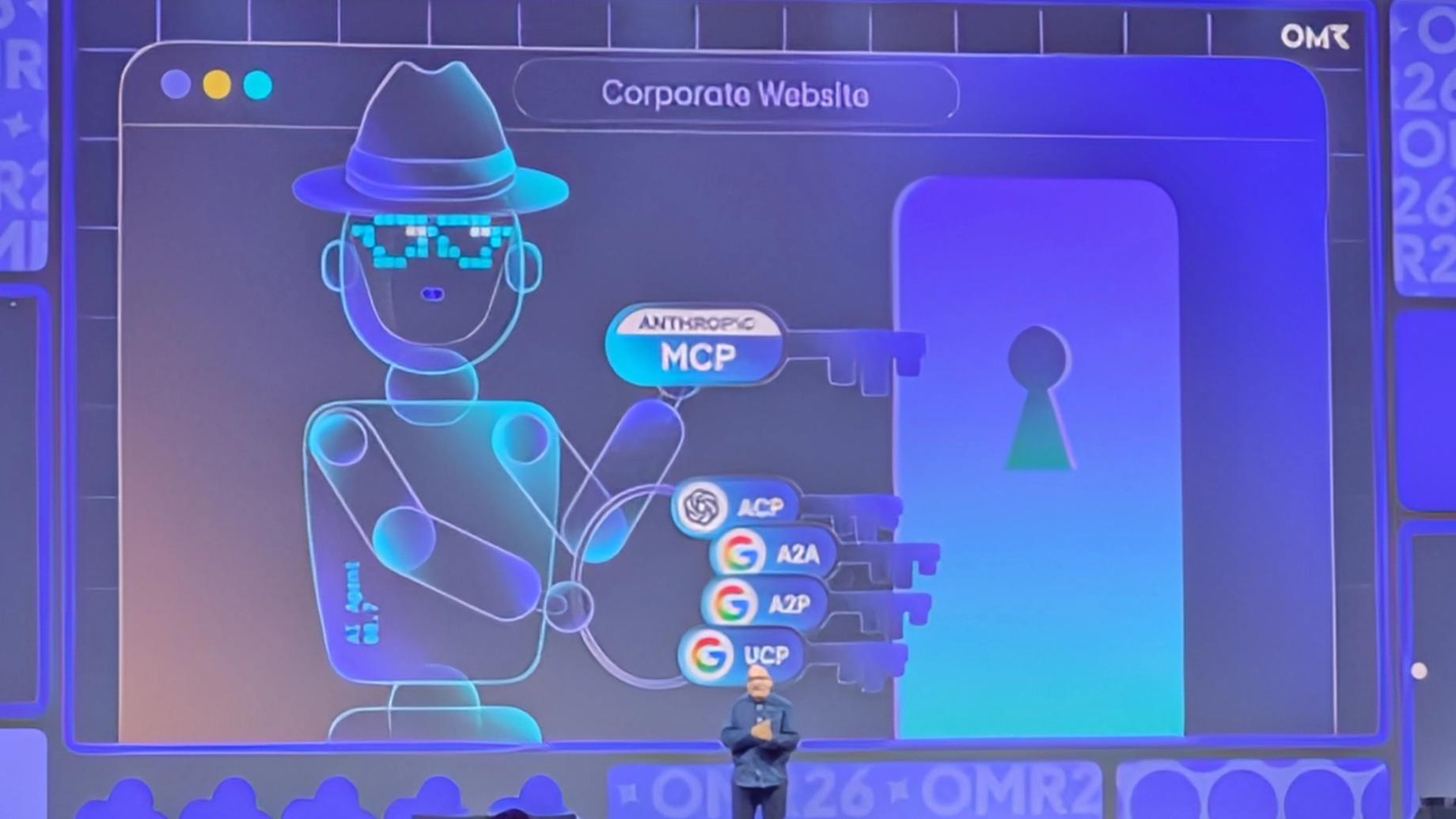
MCP is the Key for Agents
The key to opening the door to your product and content inventory for agents is MCP! This is how Roland Eisenbrand (OMR) derived it in his keynote at OMR.
Everyone in the room should have understood it, and thank you for the confirmation. vviinn provides this MCP server so that your inventory is accessible to agents. Agents communicate via natural language and multimodally. Therefore, a context layer with semantic and visual search is needed – that is vviinn!
Brands and Retailers Become Experiential for Agents with vviinn
How does it work that brands and retailers become experiential for agents with vviinn? Here is a simple guide, and below is the link list to detailed information and the video of the keynote.
First, you need to make your inventory available to vviinn. This can be done via API or simply via CSV, and vviinn will then take care of the synchronization.
In the vviinn panel or via the Config API, the campaigns for semantic and visual search must be configured. If you want to provide additional services to the agents, that is also possible.
Prerequisite to Make Your vviinn MCP Server Known to Agents
You can easily integrate the vviinn MCP server into your system and thus make your catalog known to the agents. There are currently various approaches for this. The prerequisite is the mcp-server.json file.
{
  "$schema": "https://static.modelcontextprotocol.io/schemas/2025-12-11/server.schema.json",
  "name": "{your-domain}/{your-name}",
  "description": "Context layer with semantic and visual search and discovery for {your products and services.}.",
  "version": "{vviinn API version}",
  "remotes": [
    {
      "type": "streamable-http",
      "url": "https://api.vviinn.com/mcp",
      "headers": [
        {
          "name": "Authorization",
          "description": "Bearer {read-only-token}",
          "isRequired": true,
          "isSecret": false
        }
      ]
    }
  ]
}
You can also find the current template in our technical documentation (see links below).
You should place this mcp-server.json in the root directory of your website and link it, for example, under your-domain.com/mcp.
Current Ways to Inform Agents About Your MCP
1. Register in the MCP Registry (optional)
This is the official directory for MCP servers. Registration is done via a command-line tool called mcp-publisher and requires a GitHub account.
To be honest, this approach reminds me of the early days of web search engines, where you still had to submit your website manually. Therefore, we recommend using the following methods to point to your own MCP server on your own site.
2. HTML meta-tag
Place directly in the <head> section of your HTML file:
<meta name="mcp-server" content="https://api.yoursite.com/mcp" title="My MCP Server">
<link rel="mcp-server" href="https://api.yoursite.com/mcp" type="application/json">
This is not yet a W3C standard, but we can well imagine it for the future.
3. HTTP header advertisement
This is the “cleanest” method for agents. When an agent calls your URL, your web server sends a reference to the MCP endpoint in the response header.
HTTP/1.1 200 OK
Content-Type: text/html
Link: <https://api.yoursite.com/mcp>; rel="mcp-server"; type="application/json"
The exact information can be found in the config file from our technical documentation.
4. Publish agents.md or llms.txt
A brand new approach is to publish an agents.md or llms.txt. Shopify has paved the way for this with the sitemap_agentic_discovery.xml. This file also refers to the MCP / UCP configuration file and explains which tools are available and how they can be used.
MCP for External and Internal Agents
With vviinn, you have a partner to make your content and product inventory experiential. This is a great potential to offer your products and services to LLMs and agents. And it is the chance to let the importance of your own channels, such as the corporate chatbot or the internal agent ecosystem, speak with the entire product and content inventory.
Link list
- vviinn Registration — Create an account for your company at vviinn. At the time of this publication, we offer a freemium plan for 10,000 products / items and 10,000 calls per month. panel.vviinn.com
- vviinn MCP — Technical info about the MCP server and the template for the
mcp-server.json. docs.vviinn.com/#tag/mcp - vviinn API (Product Management) — General content can also be synchronized via the same endpoint. docs.vviinn.com/#tag/product_management
- CSV Schema — vviinn uses Google’s product data specification, which can be flexibly extended for other content. support.google.com/merchants/answer/7052112
- MCP Registry — The official directory for MCP servers. registry.modelcontextprotocol.io
- mcp-publisher — Execute the registration with the command-line tool. github.com/modelcontextprotocol/registry/releases
- Info about the MCP Registry — Detailed information about the MCP Registry. modelcontextprotocol.io/registry/about
- OMR Keynote — Roland Eisenbrand explains the importance of the MCP server (see directly at minute 24:28). youtu.be/4Z4EevctSRQ
Related Posts

Joining Forces for Conversational Commerce: Announcing Our Solution with moinAI
